Vulnerabilities and what to fix first
A busy server can have hundreds of package vulnerabilities. Most will never be used against it. DeaconGuard marks each one with what is known about attackers using it, so you fix those first.
Where the data comes from
The server downloads two public sources at most every 12 hours, keeps them in its data directory, and checks every scan's vulnerabilities against them:
| Source | What it says | Shown as |
|---|---|---|
| CISA Known Exploited Vulnerabilities (KEV) | Vulnerabilities attackers are using, with the date US federal agencies must fix each by, and whether it is used in ransomware. | Known exploited |
| EPSS, by FIRST | For every CVE, the chance of it being exploited in the next 30 days, updated daily. | EPSS 42%; likely exploited from 10% |
| The distribution's own feed | The CVSS v3 base score and vector, where the distribution publishes them: Ubuntu, Red Hat and SUSE do; the others don't. | CVSS 7.5 |
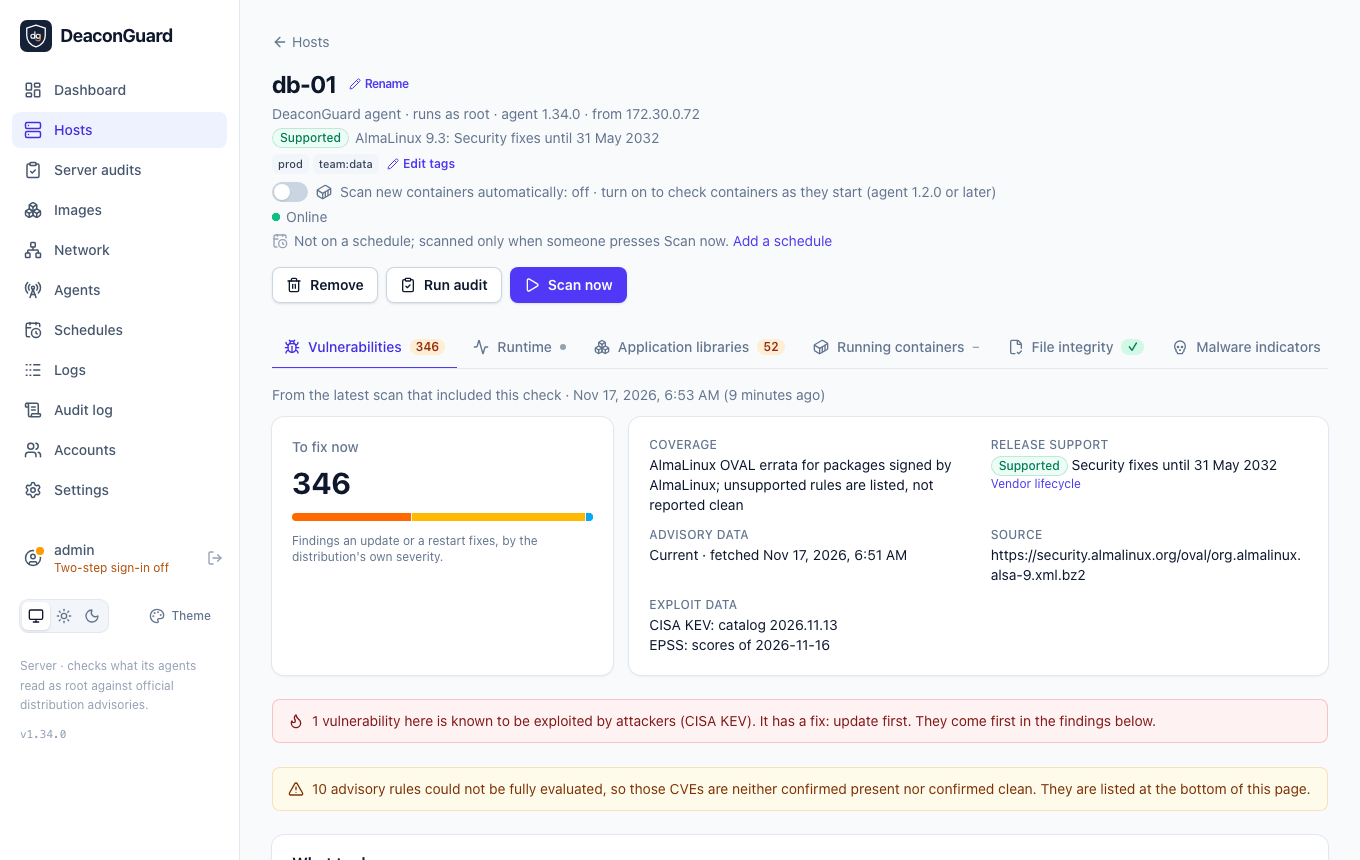
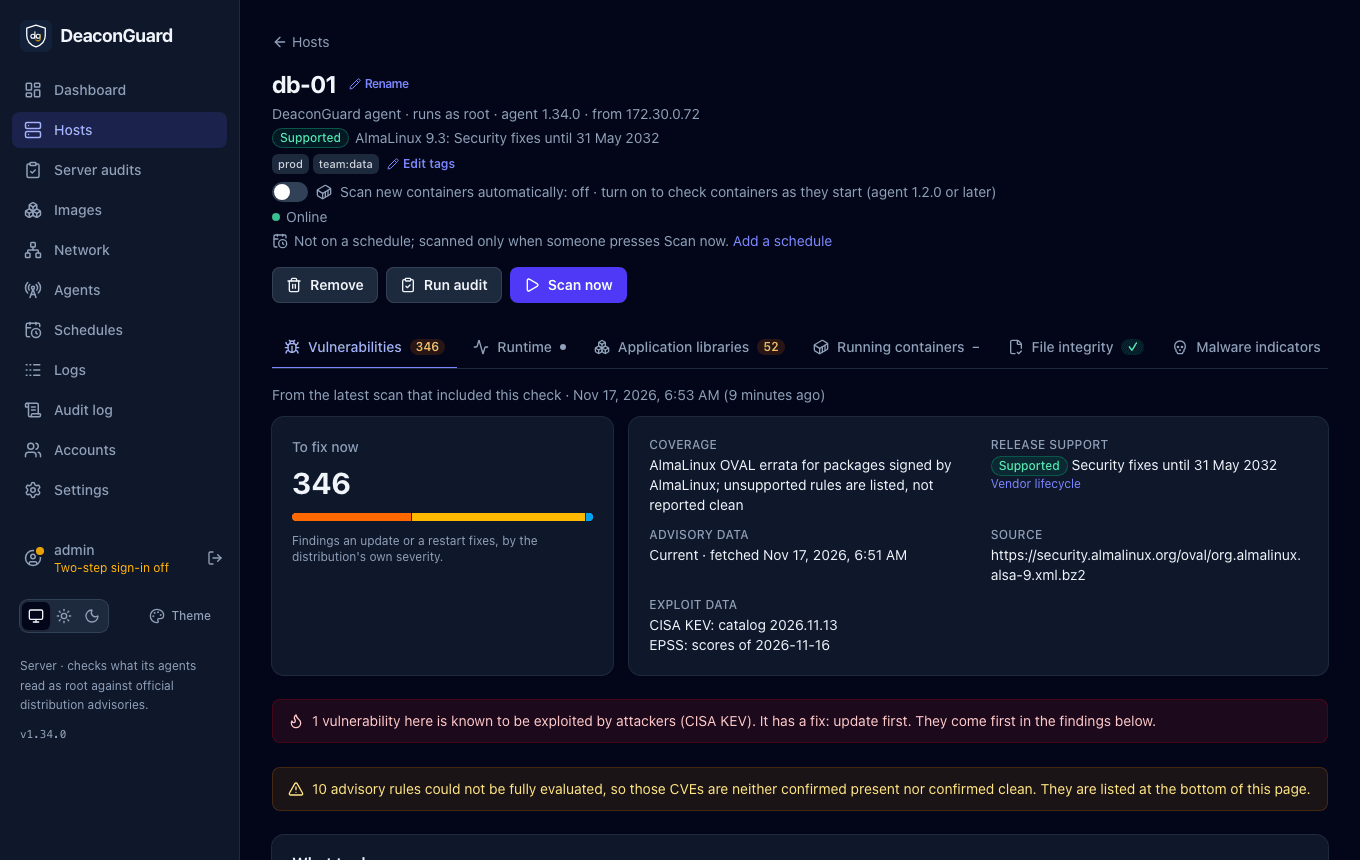
The server needs HTTPS access to www.cisa.gov and epss.empiricalsecurity.com for this. CISA's site refuses downloads from some cloud providers' addresses, such as Hetzner's; the server then takes the same catalog from CISA's copy on GitHub (raw.githubusercontent.com/cisagov/kev-data), so allow that host too; see Requirements. Agents send nothing more than before.
When a source can't be downloaded and isn't cached, the scan says so under Exploit data, and its vulnerabilities are not marked either way: missing data is never shown as "not exploited". Scans made before 0.16.0 have no exploit data; the dashboard says how many hosts are waiting for their next scan.
The order
Every list of vulnerabilities puts the most urgent first:
- Known exploited: in the KEV catalog.
- Likely exploited: an EPSS of 10% or more.
- Critical or high by the distribution's rating.
- The rest.
Within each, those an update or a restart fixes come first where a list mixes both, then by severity and the number of hosts affected.
On the dashboard
- Known exploited counts the CVEs in the KEV catalog on each host's latest scan, how many of them have a fix, and how many more are likely exploited. It opens the Vulnerabilities page with the Exploited filter.
- Most exposed hosts puts hosts with known exploited vulnerabilities first.
- Top vulnerabilities and the Vulnerabilities page show each CVE's CVSS score and exploitation. A CVE's page shows its KEV entry and due date, its EPSS and its CVSS score.
- On a scan's page, a red notice says how many vulnerabilities are known to be exploited and whether updating fixes them, and Exploited filters the findings.
Trends
Vulnerabilities over time on the dashboard and on each host's page charts the open vulnerabilities by severity, and those known to be exploited, over the last 30, 90 or 365 days. Each host counts with its latest scan that checked packages on or before each day, so a host scanned weekly still counts on the days between. A Kubernetes cluster counts as one host, its nodes' vulnerabilities each once, from 1.29.0 on; before that, its nodes counted one by one. Removed hosts leave the chart. Upgrading to 0.16.0 fills it from the scans already kept. Point at a day, or tap it, to see its numbers by severity. When nothing changed over the period, the chart says since when, as its bands are then flat.
Host tags
Tags group hosts, such as prod, staging, team:web or eu-west-1. Operators and admins add them on a host's page under its name: type a tag and press Enter or a comma. A tag is 1 to 40 lower-case letters, digits and . _ : / -, starting with a letter or digit; a host can have up to 20. Every change is in the audit log.
The Hosts page filters by tag, and its address keeps the filter, so /hosts?tag=prod can be shared. The dashboard's trend chart can show one tag's hosts.
Fix deadlines
A fix deadline is how many days a vulnerability may stay unfixed on a host, counted from the scan that first found it there:
| Vulnerability | Days, by default |
|---|---|
| Known exploited (CISA KEV) | 14, or its severity's deadline when that is sooner |
| Critical | 15 |
| High | 30 |
| Medium | 90 |
| Low | 180 |
Admins change them, or turn them off, under Settings → Fix deadlines. A vulnerability that is fixed and comes back later starts again. Only one an update or a restart fixes can be overdue: one waiting on the distribution has a date but can't be fixed yet.
The dashboard warns how many fixes are past their deadline, on how many hosts, and how many more are due in the next 7 days; its link opens Vulnerabilities with the Overdue filter. The Due column shows each CVE's earliest deadline, and a CVE's page shows every host's, with when it was first found. The digest counts overdue fixes too. Upgrading to 0.18.0 fills in when each host first had each vulnerability from the scans already kept.
Notifications
A channel can be told about new known exploited vulnerabilities on any host as soon as a scan finds them, and get a daily or weekly digest with the ones to fix first.
In audits and reports
- A server audit is graded D at most while a known exploited vulnerability has a fix waiting.
- Reports list each vulnerability's CVSS score and exploitation, known exploited first, and how many are known or likely to be exploited. CSV and Excel have CVSS, EPSS and Known exploited columns.
deaconguard report REPORT_IDlists known and likely exploited vulnerabilities first, marked[KNOWN EXPLOITED]or[EPSS 42%], and says which exploit data the scan had.